 |
Nuvoton NUC970 NonOS BSP
|
This part of the BSP project do not officially supported by Nuvoton Technology Corp.
https://github.com/OpenNuvoton/NUC970_NonOS_BSP/issues/3
GNU toolchain includes this packages
binutils: assembler, linker, ELF and library file toolsgcc: C/C++ compilergdb: debuggergprof: profilerdirectories for build and install :
CWDmake was first run/home/user/NUC970_NonOS_BSP/gnu)GZ=$HOME/gz.tar.?z files resides (toolchain packages source code)TMP=/tmpSRC=/tmp/srcSYSROOT=$CWD/sysrootsysroot is a directory where /include and /library files residesCROSS=$CWD/cross/usr/local by defeault: it requires root access and will affect all users on a developer workstationNUC970_NonOS_BSP/gnu directory and define special $XPATH variable used in all Makefiles to prefix cross-compiler $PATH before system oneIf you want to follow build process step by step manually, this is a first command creates directory structure required for build toolchain from source code
``` BSP/gnu$ make -f nuc976.mk dirs `` Note then you must run it inBSP/gnudirectory `` ~/BSP/gnu/nuc976.mk ~/BSP/gnu/toolchain.mk
~/BSP/gnu/cross ~/BSP/gnu/sysroot ~/BSP/gz /tmp /tmp/src ```
``` BSP/gnu$ make -f nuc876.mk gz ```
We'll skip this step assuming you already used BUildroot with /home/user/gz as a directory for its source code archive.
Source build of every package is managed by autotools, which generates special configure script resides in every source code package.
Every make package command
$SRC/packagename-versiondirectory,configure in out-of-tree build directory in $TMP/packagename-version$MAKE process which build package and installs it in $CROSSTo control every package confgiguration we use $CFG_PACKAGE variables
CFG_ALL will be the first argument for configure--disable-nls--prefix=$CROSSCFG_BINUTILS--with-sysroot=$SYSROOT$SYSROOT directory which will contain /include and /library files (some include files will reside in gcc installation)--with-native-system-header-dir=/include/include directory relative to sysroot--enable-lto--target=$TARGET$CFG_CPU$TARGET and $CPU must be configured before toolchain.mk will be run, so we use
```nuc976.mk
ARCH = arm CPU = arm926ej-s TARGET = -none-eabi
CFG_CPU = –with-cpu=
-include toolchain.mk ```
Run build command:
``` BSP/gnu$ make -f nuc976.mk binutils ```
Make target first tests is source code ready:
```toolchain.mk binutils: //configure ```
All makefile targets makes packet build uses automatic dependency resolving:
.tar.xz in $GZ$WGET it (see make gz above)``` //configure: /binutils/ cd ; xzcat $< | tar x && touch $@ ```
When you run any package build it will first unpack source to $SRC:
``` BSP/gnu$ make -f nuc976.mk binutils cd /tmp/src ; xzcat /home/dpon/gz/binutils/binutils-2.29.1.tar.xz | tar x && touch /tmp/src/binutils-2.29.1/configure ```
``` [1] .PHONY: binutils [2] binutils: //configure [3] [4] rm -rf /binutils ; mkdir /binutils ; cd /binutils ;\ [5] $< &&\ [6] -j4 &&\ [7] install [8] ```
make tool will not check filesystem for this names to find what files were updated, and what files must be rebuilt by dependencymake targetsmake sourcesTAB symbols, no spaces$< first source name$^ full sources list splitted by spaces$? only changed sources list$@ target nameconfigure creates set of script files will be run build itselfmake in parallel with -jN (N can be equal to number of processor cores on your workstation desktop)$CROSS (--prefix)For gcc build we require a set of support libraries. We can rely on libxxx-dev packages provided by your Linux distribution, but for devkit portability we'll build them from sources like a part of this toolchain build.
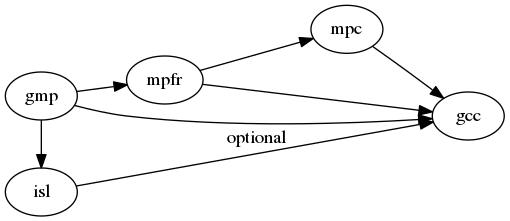
gmpmpfr <- gmpmpc <- mpfrisl <- gmp``` BSP/gnu$ make -f nuc976.mk libs0 ```
On first stage we need minimal C compiler with all features disabled, able to build code without use of standard C library (libc).
gcc has deep bound with libc, so to build libc we need standalone gcc
CFG_GCC0
--enable-languages="c"libc buildlibc will be available (dynamic memory management and multiprocessing required for C++ runtime)--without-headers --with-newlib--disable-shared --disable-threads``` gcc0: //configure [1] rm -rf /gcc ; mkdir /gcc ; cd /gcc ;\ [2] $< &&\ [3] -j4 all-gcc && install-gcc &&\ [4] -j4 all-target-libgcc && install-target-libgcc [5] ```
libgcc``` BSP/gnu$ make -f nuc976.mk gcc0 ```
gdb: GNU debuggerWe need it for GNU gdb remote debugging
``` BSP/gnu$ make -f nuc976.mk gdb ```
 1.8.8
1.8.8

